 GPT Image 2
Flux Kontext Max: High-Fidelity Reference-Aware Image Editor
Edit Images with Flux Kontext Max in 3 Simple Steps
Make precise changes without rebuilding the whole picture. Upload a reference image, describe the edit, and get a polished result that keeps the original framing, light, and subject context intact.
Upload Your Reference
Start with the image you want to improve. A sharp, well-lit reference gives the model more visual context to preserve while it edits.
Write the Edit Prompt
Name the exact change you want: swap the jacket, soften the background, add a prop, or adjust the atmosphere. Concrete prompts keep the result controlled.
Generate and Compare
Generate the edit, compare it against the original, then refine the prompt if a detail needs more polish before you download.
Why Pick This Reference-Aware Editor
For creators who care about control, the Max tier focuses on faithful local edits, clean texture reconstruction, and believable lighting integration.
Surgical In-Place Editing
Change only the part you describe while the surrounding scene stays coherent. Composition, framing, and visual context remain easy to trust.
Highest Fidelity in the Kontext Line
Compared with Kontext Pro, the Max tier renders edited areas with richer texture, cleaner edges, and more convincing light matching.
Prompt-Upsampling Toggle
Built-in prompt upsampling enhances short prompts automatically — great when you have an idea but not the exact wording.
Wide Aspect Ratio Support
Keep the canvas that fits your source: 1:1, 16:9, 9:16, 3:2, 2:3, 4:5, 5:4, 21:9, 9:21, 2:1, 1:2, and match-input.
High-Precision Edits That Keep the Scene Believable
Use it when the original image already works, but one important detail needs to change with studio-level consistency.
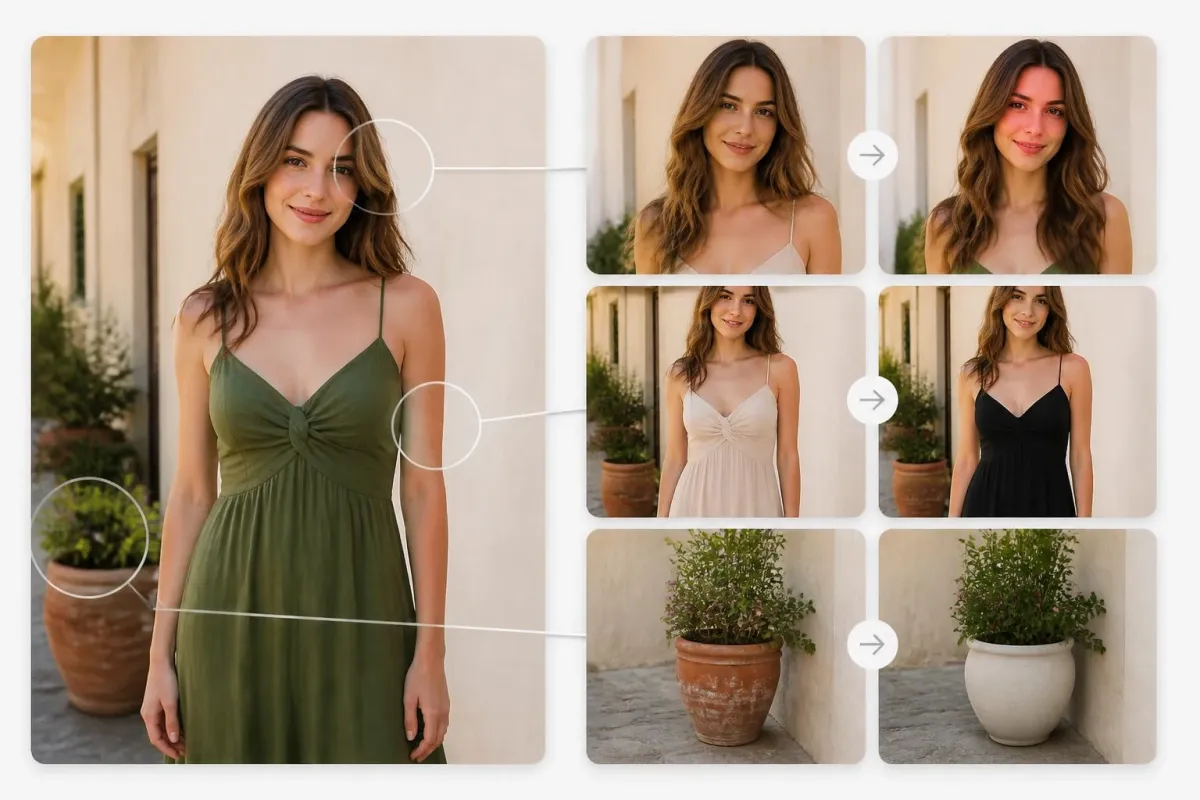
Targeted Retouching
Swap clothing, refine hair, clean up a background, or recolor a specific object while the rest of the photo stays visually stable.

Product Variants
Create colorways, material studies, and pattern swaps from one source image while keeping lighting and shadow behavior consistent.

Editorial Adjustments
Add an element, change the sky, age a subject, or shift the mood when the original framing must remain credible.

Hero Image Exploration
Explore alternate backdrops, props, and seasonal details from one strong hero image without losing the feel of the original shot.
What Users Say About Context-Aware Editing
Retouchers, editors, and visual teams value the same thing here: fewer broken frames and more results worth comparing.


Flux Kontext Max FAQs
Common questions before trying reference-based image editing on AIEnhancer.
What is Flux Kontext Max?
Flux Kontext Max is the upper-tier Flux Kontext model on AIEnhancer. It is built for reference-aware image editing — modify parts of an image while keeping the rest of the frame faithful.
How is the Max tier different from Kontext Pro?
The Max tier renders the edited region with noticeably higher detail and texture than Kontext Pro. Pro is faster for broad iteration; Max is best when the final image needs extra polish.
Do I have to upload a reference image?
Yes. This model is reference-aware, so it needs an existing image to guide the edit. For pure text-to-image work, pick Flux 2 Max or the GPT Image / Nano Banana families instead.
Which aspect ratios are supported?
It keeps the full Kontext ratio menu: 1:1, 16:9, 9:16, 3:2, 2:3, 4:5, 5:4, 21:9, 9:21, 2:1, 1:2, and match-input.
What does prompt upsampling do?
When enabled, prompt upsampling expands short instructions into richer descriptions before generation. It helps when you have a clear idea but do not want to write a long prompt.
How fast is each edit?
The Max tier is slightly slower than Pro because it pushes higher fidelity in the edited region, but edits still complete inside an interactive editing loop.
Can free users access this model?
Yes. Free users can use this model with their available credits. The required credit cost is shown before each generation.
What makes a better reference image?
Use a clear source image with the subject visible, stable lighting, and enough resolution for the details you want to preserve. The cleaner the reference, the easier it is to make precise edits.